|
RBC Express uses RSA SecurID® Token in combination with your login credentials to provide “Two-Factor Authentication at Sign In”. All users that have been assigned an RSA SecurID token (soft or hard), will need to enter their token code along with their Sign-in ID and password when signing
If you cannot locate your RSA SecurID Token, please contact your Service Administrator or your Relationship Manager for more information.
Some users may not require an RSA SecurID token for sign-in. They will be prompted to enter an RBC Express security code instead.
Two-factor Authentication at Sign In (Optional Unless Assigned an RSA SecurID token)
RBC Express uses RSA SecurID® Token in combination with your login credentials to provide “Two-Factor Authentication at Sign In”. This means that you require two credentials to sign on to RBC Express. These credentials are commonly referred to as “something you know” (your pass phrase) and “something you have” (numerical value generated by your RSA SecurID® Token).
The RSA SecurID® Hard Token is a small device (see below) issued to each individual in your organization to sign into RBC Express. The RSA SecurID Soft Token is available on your mobile device through a mobile application. The hard or soft token shows a unique, one-time sequence of numbers that change every 60 seconds. Important: all users that have been assigned an RSA SecurID token (soft or hard), will need to enter their token code along with their Sign-in ID and password when signing in.
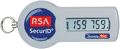
RSA Secure ID Token
Approximate Size 1” by 2 “
How are RSA SecurID® Tokens used with RBC Express?
When a user signs on to RBC Express, he/she will be prompted to enter his/her credentials (pass phrase and token numerical value). An illustration and detailed instructions follow. RSA SecurID Tokens (hard or soft) may also be required for necessary approvals within RBC Express. Some users may not require an RSA SecurID token for sign-in. They will be prompted to enter an RBC Express security code instead.
Your responsibilities
Keep your RSA SecurID® Token secure. The physical security of your RSA SecurID® Token is an important factor in ensuring the security of the system and all users must keep their RSA SecurID® Token secure at all times. Please never share your token passcode; please be vigilant against fraudulent communications and do not respond to any requests for your login credentials. RBC will never send you links to access your account, or ask you to disclose your PIN, your login password, or your security codes (token values or RBC Express security codes). If you suspect a phishing attempt, Stop, Hang Up, and Call your Relationship Manager immediately or our Help desk at 1 800-769-2535.
Replacement or additional tokens
Should an RSA SecurID® Token fail due to a manufacturer’s defect, Royal Bank will replace the RSA SecurID® Token free of charge. For lost or damaged RSA SecurID® Tokens, a replacement fee may apply. To receive additional or replacement RSA SecurID® Tokens, please request your Service Administrator to contact your Royal Bank service representative or refer to the Administration Section in RBC Express Resource Center. It will take approximately two days to provide a replacement hard token.
For more information, please contact your Service Administrator and RBC Representative.
| 

