


Monthly fee
Free+
+ This is the monthly account fee. Additional fees may apply depending on your account activity. View the fee details.
Open an Account (opens in new window) View Legal DisclaimersHelp Maximize Your Savings with a High Interest Savings Account
A high interest rate means your money works harder for you, which may help you reach your goals quicker.
Account Benefits

Earn interest on every dollar
Help grow your savings faster with interest calculated daily and paid monthly so every dollar works for you.

Access your money instantly
Transfer funds anytime between your RBC accounts online, by phone through self-served automated services, or at an RBC ATM with no fees or delays, plus one free RBC ATM cash withdrawal each month.

Save automatically with no minimums
Start saving with any contribution, no monthly fee, and no minimum balance. Set up automatic transfers to help build your savings effortlessly toward your goals.
RBC High Interest eSavings Account Interest Rates
| Time | Rate |
|---|---|
| First 3 months | 4.60%* |
| Thereafter | 0.550% |
This Account May be Ideal for You If:
You want to grow your savings faster
Earn competitive interest on every dollar, with your money working harder for you every day.
You’re interested in goal-based saving
Set up automatic transfers to effortlessly grow your savings toward future goals.
This Account May Not be Ideal for You If:
You make frequent transactions
This account is designed for saving — not for frequent debit use or bill payments.
Learn about the RBC HISA
What is a high interest savings account (HISA)?
A high interest savings account (HISA) or high yield savings account (HYSA) internationally, is a type of savings account that offers a higher interest rate than a standard savings account. Your money can grow faster over time, while still being available to you when you need it.
How does HISA work?
Interest is calculated daily on the closing balance and paid monthly. It is a secure and convenient way to save for something that’s important to you.
How do I use my HISA?
You can move money in and out of your HISA whenever you need. A great way to use your HISA is by setting up pre-authorized contributions so you don’t need to think about saving money over time.
More Account Benefits and Fees
Currency
Canadian
Monthly Debits3
1 Free RBC ATM cash withdrawal / month
Account Transfers
Free self-served transfers between any RBC Royal Bank personal deposit accounts in your name
Debits Exceeding Monthly Limit
$5.00 each
Interac and PLUS System ATM Network Access Fees4
Interac: $2.00
PLUS System: $3.00 (Within Canada and U.S.)
PLUS System: $5.00 (Outside Canada and U.S.)
eStatement and eNotifications
Free — including cheque images viewed online less than 90 days old
Access to Online, Mobile, and Telephone Banking7
Free
Tailored Advice with a Trusted Advisor with Your High Interest Savings Account

Get personalized guidance
Gain confidence in money management with our trusted advisors.
Enjoy nationwide support
Get access to over 200 branches and ATMs that are ready to serve you.

Speak with us in your preferred language
Receive help in more than 100 languages, ensuring every conversation feels comfortable and personal.
All Your Banking, in Your Hands
Simplify budgeting
Receive tailored budget suggestions that match your spending and saving patterns.
Spot issues quickly
Receive alerts for duplicate or unusual transactions right in the RBC Mobile app.
Gain personal insights
Track grocery spending, upcoming payments and more with NOMI Insights.
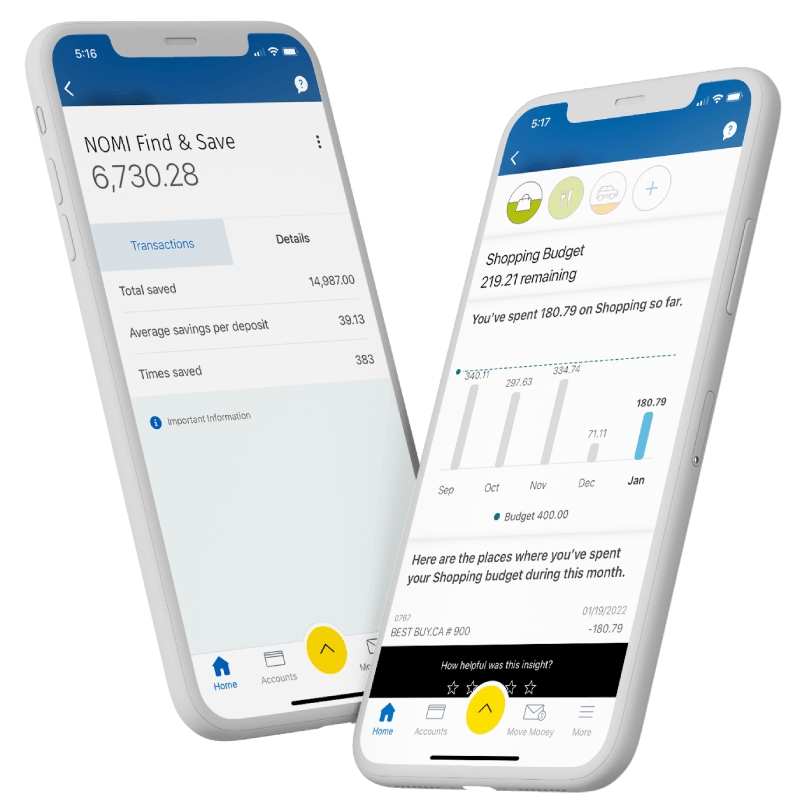
RBC Mobile App

The RBC Mobile app gives you personalized tools and insights so you can save, spend and manage your money with ease.


Scan or text “RBC” to 722722 and we’ll send you the link to your phone.
How We Keep Your Money Safe

Lock your card instantly
Easily lock your card if misplaced and unlock it again with just a tap.
Security guarantee
Feel confident knowing your money is CDIC-insured up to $100,000 and secured against unauthorised transaction.9

Savings Accounts for Kids
It’s never too early for kids to start saving. A children’s savings account can help kids develop smart money habits while giving them a place to grow their savings. Take a look at our accounts for kids 0-12 and students 13+.
Explore Youth and Student AccountsFrequently Asked Questions
Here are some of the benefits of opening a high interest savings account (HISA) with RBC:
- High interest rate on every dollar
- Free account transfers 24/7 with no delay8, including ATM and unassisted telephone fund transfers, from this account to any other RBC Royal Bank personal deposit account in your name
- Free access to RBC Online, Mobile, and Telephone Banking7
- No minimum deposit requirements
- Ability to set up Save Matic from your banking account to your savings account
- Know what your money is up to with MyAdvisor
At RBC, the RBC High Interest eSavings account typically offers the highest interest rate. For details on current rates, please see our savings accounts.
Like other types of savings accounts, the interest rate for the RBC High Interest eSavings account is subject to change based on market conditions. You can view the current rates here.
From time to time, RBC may also offer a promotional rate for the RBC High Interest eSavings account.
While interest for the RBC High Interest eSavings account is calculated daily, it’s paid monthly. At the end of each day, we use your account balance to calculate a daily interest payment. Then, we add up your daily earned interest (if any) throughout the month to deliver a monthly interest payment at the end of each month.
The main difference between the RBC High Interest eSavings account and other RBC savings accounts is that it offers higher interest.
Another difference is that the RBC High Interest eSavings account offers free eStatements and eNotifications. Other RBC savings accounts such as RBC Day to Day Savings and RBC Enhanced Savings also offer paper statements for a small fee.
For a full comparison of RBC savings accounts you can compare savings accounts.
The easiest way to commit to a regular savings plan is to arrange for pre-authorized transfers from your banking account to your designated savings account. Simply specify the amount and how often you want the transfers to take place — for example, once a week, every two weeks or once a month. You may even want to schedule these to occur just after your paycheque is direct-deposited into your chequing account.
- Step 1: In your Online Banking, under Quick Payments and Transfers, click on Pay Bills and Transfer Funds.
- Step 2: On the left hand menu, click on Set Up Save-Matic.
- Step 3: Enter the Amount you want to save, choose your From and To accounts, When to start, and select how often from the Receive Frequency options, then click on Submit.
- Step 4. Review your information and click on Confirm.
You can open an RBC High Interest eSavings account online, in the RBC Mobile app, by visiting a branch (opens in new window) or by calling us at 1-800-769-2561.
When choosing a savings account, you’ll want to consider how it helps you reach your goals. Factors that are important to consider include:
- Interest rates. The higher the rate, the faster your money can grow
- Fees. Monthly fees, fees for withdrawals or other charges could eat into your savings
- Accessibility. Do you need easy access to your money? With some accounts, there are multiple steps or fees for withdrawing funds
- Minimum balance. Some accounts pay higher interest when you reach minimum balance thresholds
Yes, the RBC High Interest eSavings account is a safe place to keep money that you don’t need to access every day. Deposits you make to your high interest savings account are eligible for protection by the Canada Deposit Insurance Corporation (CDIC).
Yes, the communicated rate is guaranteed. However, the rate will change when the Bank of Canada’s rate changes without any notice.
In Canada, there’s no limit on the number of high interest savings accounts (HISAs) you can open across financial institutions. However, individual banks may have their own limits.
At RBC, there’s no limit on the number of HISAs you can open.
To find more ways to save, you can:
- Sign in to the RBC Mobile app,
- Tap ‘More’
- Tap ‘NOMI Find & Save’ and turn it on.
After you turn on NOMI Find & Save, we will get to know your spending & saving habits in your source chequing account to find opportunities to save for you.
Learn More About High interest Savings in Canada
Discover resources to help you grow your savings faster, including high-interest savings
For Banking Accounts only, Third Party Payments will not count toward the number of included Debit Transactions per Month.
For RBC Day to Day Banking Accounts only, Point of Sale Purchases made at public transit authority merchants classified by Interac’s “Merchant Category Code” (MCC) as “Local and Suburban Commuter Passenger Transportation, including ferries” will not count towards the number of included Debit Transactions per Month. Debits, including those Point-of-Sale Purchases, for which the merchant may offer public transit services but is not categorized under Interac’s “Local and Suburban Commuter Passenger Transportation, including ferries” MCC, will count towards the number of included Debit Transactions and will result in an Excess Debit Transaction Fee if you go over the number of included debits per Month.
For RBC High Interest eSavings Accounts, one cash withdrawal from an RBC ATM per month will not result in an Excess Debit Transaction Fee.
An ATM operator surcharge (also called convenience fee) may be charged by other ATM operators. The convenience fee is not a Royal Bank fee. It is added directly to the amount of your cash withdrawal. All clients who use non-RBC ATMs may be charged a convenience fee regardless of the type of account they hold.
ATM use outside Canada
Each Account cash withdrawal at an ATM outside Canada displaying the PLUS System symbol and any fees that may be imposed by any third party for using the ATM are converted to Canadian dollars at an exchange rate which is 2.5% above the benchmark rate set by the payment card company when the transaction is posted. Exchange rates fluctuate and, as such, the rate applied will usually differ from the posted exchange rate at the time of the transaction.
ATM - Unlimited banking transactions including Interac and PLUS System network fees waived
ATM operator surcharge (also called a convenience fee) may be charged by other ATM operators. The convenience fee is not a Royal Bank fee and is added directly to the amount of your cash withdrawal. All clients who use non-RBC ATMs may be charged a convenience fee regardless of the type of account they hold. Each account cash withdrawal at an ATM outside Canada displaying the PLUS System symbol, and any fees that may be imposed by any third party for using the ATM, are converted to Canadian dollars at an exchange rate which is 2.5% above the bench mark rate set by the payment card company when the transaction is posted. Exchange rates fluctuate and, as such, the rate applied will usually differ from the posted exchange rate at the time of the transaction.
ATMs - 3 withdrawals from other bank ATMs refunded per Monthly Cycle
ATM operator surcharge (also called a convenience fee) may apply. It is charged by a third party and added directly to the amount of your cash withdrawal. Totals are not cumulative, and if not used, may not be carried over into the next Monthly Cycle.