



TLDR
E-Transfers are an easy way to send and receive money – whether paying a contractor, paying rent or reimbursing a friend.
Sending an e-Transfer feels routine, so many of us send them without a second look.
e-Transfer scams take several forms, from forged overpayments to redirected invoices to urgent requests that appear to come from someone you know.
Verifying requests, tightening your account security and limiting who has your contact details can reduce your risk.
E-Transfers have become one of the most common ways to send money – whether it’s paying a babysitter or contractor, reimbursing a friend for dinner, paying your rent or sending money to kids away at school. They’re so easy and convenient, in fact, that senders and receivers often don’t think twice about the transaction.
It’s this sense of ease and routine that has made many vulnerable to e-Transfer scams. When you can send or receive money without thinking much about it, the small checks that might normally catch a problem could be skipped – such as reading the sender’s address closely, confirming the amount or asking why the payment details have changed. After all, a request that arrives at the right moment, from a name you recognize in a format you see regularly, doesn’t invite much scrutiny.
What is an e-Transfer scam?
An e-Transfer scam is any attempt to trick you into sending money to a fraudster, or into handing over the credentials that let someone intercept a transfer meant for you. These are the most common forms:
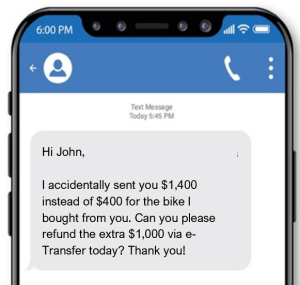
Overpayment
| How it works | Red flags |
|---|---|
A buyer sends more than the agreed amount for something you’re selling, then asks you to refund the difference. The original transfer is then forged or reversed – and only the refund is ‘real’ money. |
|
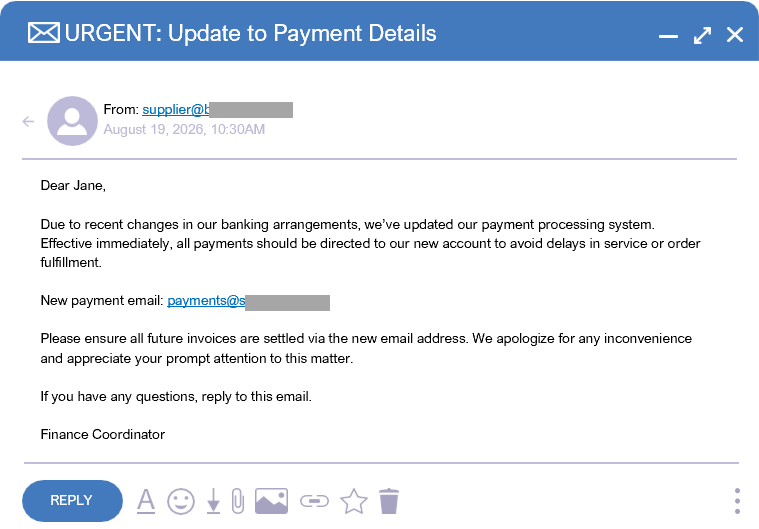
Invoice payment redirection
| How it works | Red flags |
|---|---|
A scammer watching an email thread sends a message that appears to come from a business you’re already paying, with updated payment details. |
|
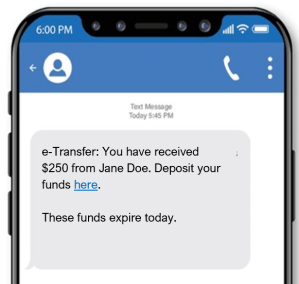
Phishing and credential theft
| How it works | Red flags |
|---|---|
A text or email announces an e-Transfer and links to a page that copies your bank’s sign-in screen. The scammer sees the credentials you enter. |
|
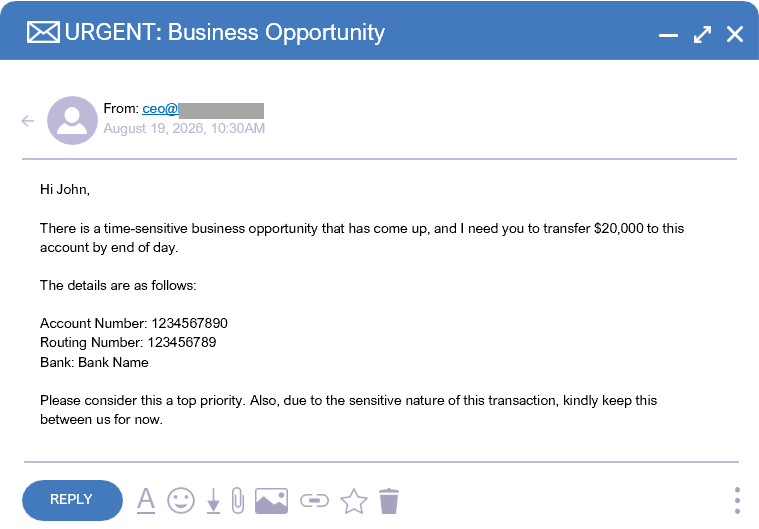
Executive impersonation
| How it works | Red flags |
|---|---|
Someone posing as a senior leader messages an employee with an urgent, confidential request to send an e-Transfer. |
|
Romance and emergency
| How it works | Red flags |
|---|---|
A scammer builds trust over weeks, or poses as a relative in trouble, then asks for an e-Transfer to cover a crisis. |
|
How to protect your e-Transfers
Whether you send e-Transfers often or only once in a while, these steps can help keep your money – and your credentials – out of the hands of scammers.
-
Verify requests independently. Before sending money in response to a message, confirm it through a secure channel, such as a number you already have (not one provided in the request). This applies to invoices with new payment details, urgent asks from a manager, an emergency request from a relative – and anything that comes with a reason to act quickly.
-
Strengthen your account security. There are a few ways you can boost your account security and reduce the risk of e-Transfer scams:
-
Limit your exposure. The email address and mobile number you register for e-Transfers are what a scammer needs to reach you. Try to share them only with people and businesses you deal with directly and keep them off public profiles and listings to keep these details private.
Fallen victim to an e-Transfer scam? Here’s what to do next
Fraud attempts are designed to be convincing – and anyone can be convinced into giving too much information to a scammer. It’s best to act quickly if you have inadvertently sent money or provided information to the wrong person.
Report the incident. Notify your bank and law enforcement.
Scan your devices. If you clicked on a link or attachment, it’s a good idea to run an antivirus scan to check for malicious software.
Change your passwords. Update passwords for any accounts that might be compromised.
Lock down your credit. If you shared personal information with the scammer, it’s a good idea to place a fraud alert on your credit report.
Lock or cancel your credit card. If you inadvertently provided the scammer with your credit or debit card information, immediately lock and then cancel your card.
Alert others. Warn friends and family so they don’t fall for the same scam.
Our Digital Safety and Scams guide includes a detailed directory of reporting contacts in Canada, the United States and the United Kingdom, including credit bureau and banking details.
E-Transfers are meant to be easy, convenient and fast. Protecting them is just as simple. One quick check on the details before you send or receive a transfer can keep your money and information out of the wrong hands.
Spotting scams is becoming increasingly hard to do. The best thing is to stay aware of current scams and understand the ways you can protect yourself.
This article is intended as general information only and is not to be relied upon as constituting legal, financial or other professional advice. A professional advisor should be consulted regarding your specific situation. Information presented is believed to be factual and up-to-date but we do not guarantee its accuracy and it should not be regarded as a complete analysis of the subjects discussed. All expressions of opinion reflect the judgment of the authors as of the date of publication and are subject to change. No endorsement of any third parties or their advice, opinions, information, products or services is expressly given or implied by Royal Bank of Canada or any of its affiliates.